
Here are five premium standing desks you’ll want in 2026. The Casaottima 63″ Reversible Electric L-Shaped Desk runs 63W x 47D with a 27.9–46.1″ height, plus memory presets. The VIVO Electric Standing Desk is 71×30, with four memory heights and up to 220 lb. options. The 71″ Standing Executive Desk includes a privacy panel and under-desk storage, 27.9–45.7″ range. ErGear 55×28 offers 176 lb capacity and a drawer, while the Vari Ergo 54” has four presets, 25–50.5″ range. More details await.
| Casaottima 63″ Reversible Electric L-Shaped Desk White | 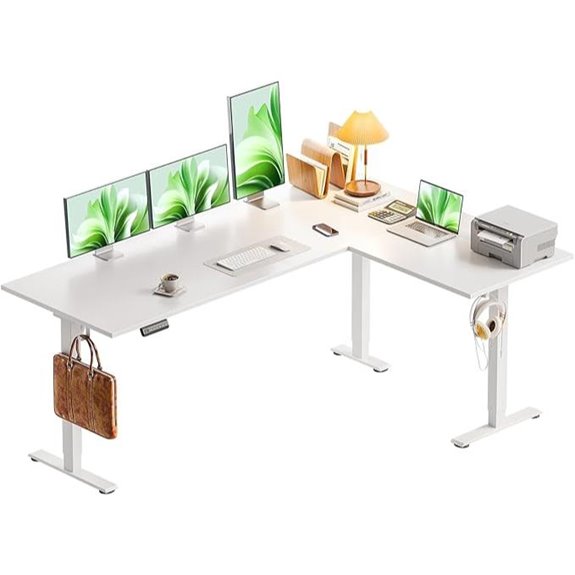 | Best Overall | Type: Height Adjustable Corner Standing Desk | Height Range: 27.9–46.1 in | Memory Settings: 3 memory buttons | VIEW LATEST PRICE | See Our Detailed Review |
| VIVO Electric Standing Desk 71×30 Memory Height Adjustment | 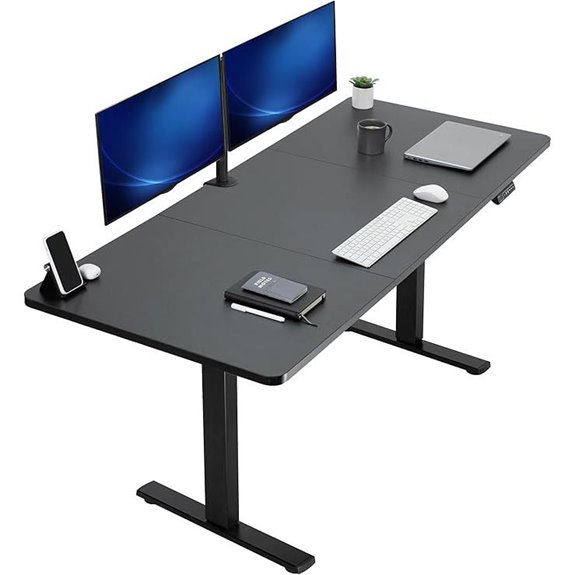 | Premium Stability | Type: Standing Desk | Height Range: 29.2–48.4 in | Memory Settings: 4 memory presets | VIEW LATEST PRICE | See Our Detailed Review |
| 71″ Standing Executive Desk with Privacy Panel | 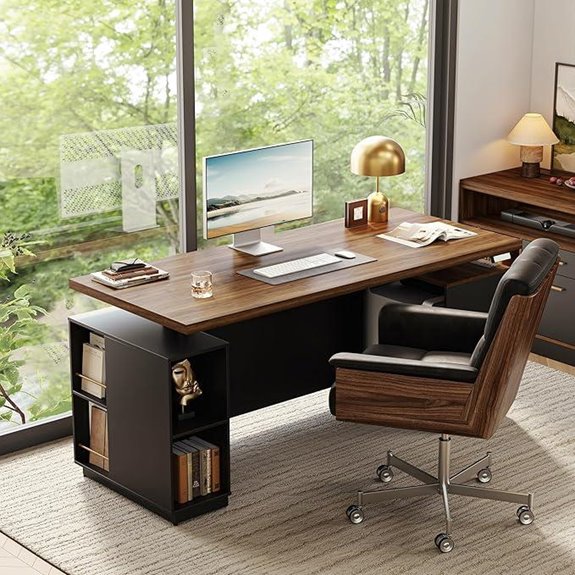 | Executive Size Power | Type: Standing Executive Desk | Height Range: 27.9–45.7 in | Memory Settings: 2 memory settings | VIEW LATEST PRICE | See Our Detailed Review |
| ErGear Height Adjustable Electric Standing Desk (55×28) | 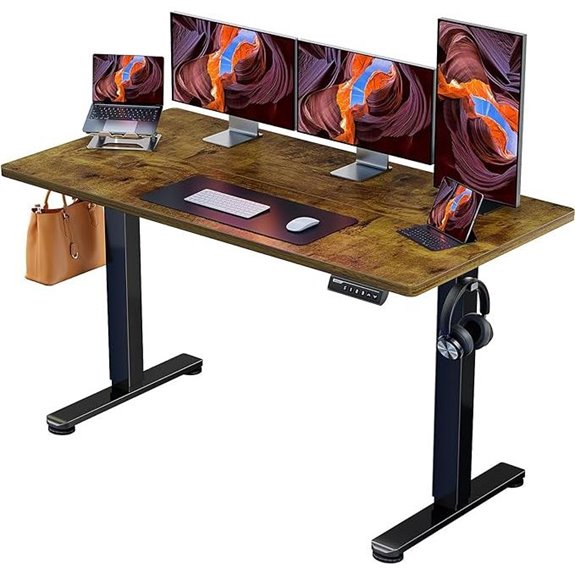 | Solid Steel Build | Type: Height Adjustable Standing Desk | Height Range: 28.35–46.91 in | Memory Settings: 3 memory settings | VIEW LATEST PRICE | See Our Detailed Review |
| Vari Ergo Electric Standing Desk with Memory Settings |  | Ergonomic Luxury | Type: Height Adjustable Standing Desk | Height Range: 25–50.5 in | Memory Settings: 4 programmable memory settings | VIEW LATEST PRICE | See Our Detailed Review |
More Details on Our Top Picks
Casaottima 63″ Reversible Electric L-Shaped Desk White
The Casaottima 63″ Reversible Electric L-Shaped Desk is a strong choice for anyone who wants a versatile, space-saving setup. We present the facts in plain terms, so you know what to expect. The desk sits at 63W x 47D x 28.4H inches and weighs about 74 pounds, with a white, modern, rectangular top. It offers an electric height range from 27.9 to 46.1 inches and has three memory presets for quick changes. The left or right sub-table plate can be swapped, and the sturdy alloy base supports the engineered wood top. Two hooks add extra storage, making it practical for work or gaming.
- Type:Height Adjustable Corner Standing Desk
- Height Range:27.9–46.1 in
- Memory Settings:3 memory buttons
- Weight Capacity:Not specified (built for stability; typical home use)
- Frame/Construction Material:Alloy steel base with engineered wood top
- Assembly Required:Yes (assembly manual included)
- Additional Feature:Interchangeable sub-table plate
- Additional Feature:3-piece board construction
- Additional Feature:2 hooks for storage
VIVO Electric Standing Desk 71×30 Memory Height Adjustment
VIVO’s Electric 71×30 standing desk stands out for its memory height adjustment, letting you save up to four preferred heights so you can switch between sitting and standing with a quick press. We look at its 71 by 30 inch top, black finish, and all-steel frame that supports up to 220 pounds. The electric motor gives a height range from about 29.2 to 48.4 inches with precise adjustments. It includes a memory controller for four presets and comes with assembly tools and a three-year warranty. It’s a solid, practical option for balanced work setups.
- Type:Standing Desk
- Height Range:29.2–48.4 in
- Memory Settings:4 memory presets
- Weight Capacity:Up to 220 lbs
- Frame/Construction Material:All-steel frame; particle board top
- Assembly Required:Yes (includes assembly tools)
- Additional Feature:Memory presets (4)
- Additional Feature:All-steel frame
- Additional Feature:1 inch desktop
71″ Standing Executive Desk with Privacy Panel
This 71″ Standing Executive Desk with Privacy Panel is best for users who want a large, uninterrupted work surface with built-in privacy and solid stability. We review the ModernMate 71″ Standing Executive Desk with Privacy Panel, an electric height adjustable model in black walnut. It measures 71″ by 30″ with height from 27.9″ to 45.7″, and supports up to 176 pounds. Features include a one-piece top, integrated under-desk storage, and a privacy panel for focus. It uses a quiet lift under 50 db, two memory height buttons, and comes with a hand control and power adapter. Assembly is required; warranty details vary.
- Type:Standing Executive Desk
- Height Range:27.9–45.7 in
- Memory Settings:2 memory settings
- Weight Capacity:176 lbs
- Frame/Construction Material:Cold-rolled steel frame
- Assembly Required:Yes (assembly required)
- Additional Feature:Privacy panel
- Additional Feature:Under-desk storage
- Additional Feature:50,000 lift cycles
ErGear Height Adjustable Electric Standing Desk (55×28)
For a reliable, mid-sized sit-stand option, the ErGear Height Adjustable Electric Standing Desk (55×28) stands out with its sturdy, all-steel frame and a solid 176-pound weight capacity, making it a practical pick for most home offices. We note the 55 x 28-inch top, two-piece desktop, and vintage brown finish. The lifting column is aerospace-grade, with 3 height positions from 28.35 to 46.91 inches and memory settings for three favorites. It includes a single drawer, easy assembly, low-VOC materials, a limited warranty, and a weight-worthy motor tested many times for reliability.
- Type:Height Adjustable Standing Desk
- Height Range:28.35–46.91 in
- Memory Settings:3 memory settings
- Weight Capacity:176 lbs
- Frame/Construction Material:Solid steel frame
- Assembly Required:Yes (assembly required)
- Additional Feature:Two-piece desktop
- Additional Feature:100+ stability tests
- Additional Feature:3 memory positions
Vari Ergo Electric Standing Desk with Memory Settings
The Vari Ergo 54×26 Electric Standing Desk with Memory Settings stands out for users who want reliable, programmable height options in a compact footprint. We note its 54” by 26” surface, 1.25” laminate top, and 200 lb capacity, with a curved waterfalL edge for comfort. The desk offers a 25” to 50.5” height range and 4 memory presets. It ships in two boxes for quick assembly, includes built-in cable management, and uses a tool-free setup. A durable reclaimed wood design meets a modern, freestanding frame, with a limited lifetime warranty for material or workmanship defects. Model 402389.
- Type:Height Adjustable Standing Desk
- Height Range:25–50.5 in
- Memory Settings:4 programmable memory settings
- Weight Capacity:200 lbs
- Frame/Construction Material:Metal frame with laminate top
- Assembly Required:Yes (tool-free, quick 2-step process)
- Additional Feature:Curved waterfall edge
- Additional Feature:Reclaimed wood surface
- Additional Feature:4 programmable memory settings
Factors to Consider When Choosing Premium Standing Desk
When you choose a premium standing desk, start by checking the height range span to fit your desk setup and eye level, and look for desks that offer at least a +/- 15 cm adjustment to cover sitting and standing scenarios. Pay attention to stability and build quality, expecting a solid frame, minimal wobble, and smooth motion with sturdy legs and a wide footprint, especially if you type while standing. Consider weight capacity and features like memory settings, plus the overall value for price, imagining how a model with strong construction and practical extras, such as pre-set heights and durable switches, fits your daily work needs.
Height Range Span
Height range span matters because it affects how easily you switch from sitting to standing and back again. The height range span of a standing desk is crucial for versatility, with many models offering adjustable ranges from about 25 inches to over 50 inches. A wider range lets you tailor the desk to different heights and preferences, helping you switch positions without strain. Desks with electric height adjustment often include memory settings, so you can save favored heights for seated and standing use. Be mindful that broader adjustments can influence stability; stronger frames are common in taller ranges. Ideal ranges match average seated and standing heights, ensuring comfortable posture without overreaching or slouching. Check specifications, compare prices, and choose a model that fits your workspace.
Stability and Build
Stability starts with a solid frame, using either solid steel or alloy steel to create a sturdy backbone that supports daily use without wobble. The frame material matters, because solid or alloy steel adds rigidity and durability you can feel. Desks tested for stability, such as those with over 50,000 lift cycles, show reliable operation under varying loads. Reinforced construction features, like 3-piece board designs and heavy-duty legs, contribute to overall steadiness during transitions. A wide base and ample leg span improve balance when you shift from sitting to standing. Even without discussing weight capacity, these design decisions help prevent wobble during daily tasks and frequent height changes. In practice, choose models that emphasize sturdy framing for long-term reliability.
Weight Capacity
Weight capacity matters a lot when choosing a premium standing desk, and most models today range from about 176 lbs to 220 lbs, so you can support laptops, monitors, and accessories without worry. When you pick a desk, check the total weight it can carry, including multiple monitors and heavy laptops, to keep stability under use. The capacity is usually set by the desk’s construction materials, with steel frames often giving higher limits than particle board. Some desks show stability ratings from tests like 50,000 lift cycles, which can hint at long-term performance. Choose a capacity that matches your current gear and allows future upgrades, so you’re ready for changes in your setup.
Memory Settings
Memory settings let you save your preferred heights so you can switch from sitting to standing in an instant. You can program up to four presets on many electric desks, making quick height changes simple during the day. This feature saves time and reduces interruptions, especially when you share a desk with others or have long work sessions. A display often shows the current height, letting you adjust precisely for posture and reach. Memory buttons support multiple users, so everyone gets their preferred setup without manual fiddling. Look for adjustable step ranges, like 2 to 4 inches per preset, and clear labeling. Check compatibility with your desk’s motor speed and warranty terms for long‑term reliability. Prices vary, typically around $300–$600 extra.
Solid Construction
A solid construction matters because it directly affects stability, safety, and long‑term reliability when you adjust heights throughout the day. You’ll find desks with engineered wood tops and alloy steel bases that stay steady during use. Stability testing, like the 100,045 tests some models undergo, helps show a product’s durability over time. Look for a weight capacity around 176 to 220 lbs, which supports multiple monitors and other gear without wobble. A well‑built frame should have reinforced legs to minimize sway when you raise or lower the desk. Choose materials that meet safety standards, including low‑VOC and formaldehyde‑reducing components, for a healthier space. Solid construction supports confidence, function, and longer product life.
Assembly Ease
Many premium standing desks are designed for easy setup, and checking assembly details can save you time and frustration. When you pick one, look for detailed instruction manuals and clearly labeled parts, which can cut setup time dramatically. Many desks require assembly and may include all necessary tools, making the process straightforward and user-friendly. Seek models that offer a quick assembly process, with some able to be assembled in just two steps, which boosts convenience. Check if the product includes an assembly guide or user manual for extra support during setup. Consider the complexity of the design; simpler layouts with fewer components typically lead to faster, less frustrating installation. Prioritize practical features like clear labeling, modular parts, and reasonable price for peace of mind.
Frequently Asked Questions
Do These Desks Ship Assembled or Require Assembly?
Most premium standing desks ship partly assembled or require only minimal setup, not full assembly. Many models include a pre-assembled frame, ready-to-use desktop, and simple hardware you tighten with a few screws. Some offer tool-free height adjustments, with installation taking about 15–30 minutes. Prices vary by size and features, from roughly $799 to $2,199. If you need exact details, check each model’s manual for assembly steps, included parts, and recommended tools.
What Is the Noise Level During Height Adjustments?
Noise during height adjustments varies by model, but most premium desks run quietly at about 40–50 decibels on lower speeds and rise to 60–65 decibels at full speed. You’ll typically hear a soft motor hum, plus the click of anti-collision sensors if activated. If you work near others, look for whisper-quiet or “low-noise” modes and check vendor specs for exact decibel ratings and adjustable speed ranges. Consider soft-start motors for smoother stops.
How Do Memory Height Settings Work Across Models?
Memory height settings work by saving preferred heights per model, then syncing across your profiles when supported. You’ll usually press and hold a “memory” button, select the numbered slot, and save a height after adjusting with motorized lift. Some desks auto-sync via cloud, others require manual transfer between models via USB or app, and not every model shares the same slots. Expect 2–4 memory presets, price ranges around $350–$1,200. Check compatibility before buying.
Are There Any Warranty Limitations for Commercial Use?
There can be warranty limits for commercial use. Most brands offer shorter coverage, often 1–3 years, for desks used in businesses, with exclusions forUnauthorized installations or modifications. Check if the frame, motors, and electronics have separate terms, and whether on-site service or mail-in repair is included. Expect required proof of purchase, serial numbers, and proper installation. Some models include extended warranties with annual service fees. If you plan heavy daily use, verify commercial terms before buying.
Can These Deskssupport Dual-Monitor Setups Effectively?
Yes, these desks can support dual-monitor setups if you pick the right frame and desk top. Look for a frame with at least 1,000–1,200–mm width, which fits two 24– to 28–inch monitors, plus a stable surface around 60–80 cm deep. Check weight capacity, usually 150–200 lbs total, and cable management for clean setup. Expect prices around $299–$899, depending on motor options and features like memory presets. For heavy setups, a wider unit helps.
Wrapping It Up
If you’re choosing a premium desk, review size, motor noise, and memory settings carefully. The Casaottima offers a 63″ footprint with a reversible L-shape, while the VIVO model adds memory height and a 71×30 surface. For privacy and space, consider the 71″ Standing Executive Desk. ErGear tracks smooth adjustments at 55×28, and Vari Ergo emphasizes programmable positions. Balance price, build quality, and delivery ease to match your room layout and daily use.


I’m using a privacy screen and a side laptop tray, and I noticed the 71″ Standing Executive Desk has a privacy panel. Does that panel ever mess with comfort or cable routing when I’m moving from seated to standing most of the day?
Usually it doesn’t cause an issue if the privacy panel is aligned with your normal monitor position, but it can affect comfort a bit—mainly your viewing angle and how close your face feels to the screen area during the seated-to-standing transitions. Before you commit, test whether your monitor (and any monitor arm depth) still lands at your preferred distance and whether the panel edge sits where it won’t crowd your peripheral view. For cables, route power and data to the back/side of the panel area and leave a small slack loop so cords aren’t pulled or pinched as the desk changes height. Also confirm your laptop tray doesn’t block access to any cable points underneath.
I’m planning a standing desk setup and I want to make sure I can still get to my keyboard tray/monitor arm without fighting the frame. Between the 71×30 VIVO and the 55×28 ErGear, which one is easier to live with for tight clearance under the desk?
For tight clearance where you need to slide in to reach the keyboard tray and your monitor arm without bumping the desk frame, the ErGear 55×28 is generally easier to live with. Its smaller footprint leaves more usable space around the edges for arm hardware and cable routing, so you’re less likely to fight the base when you’re getting in and out for adjustments. The VIVO 71×30 can feel more “blocky” under the desk simply because it’s wider, even if it’s stable. If you’re constantly tweaking the keyboard tray or reworking cable runs, the ErGear’s tighter base will usually give you better real-world clearance in a Spokane setup.
I’m planning a loaded standing setup with a monitor arm plus a heavier dual-monitor setup, and I care about how much the desk “gives” when I type. Which of your five picks handles stability best, and what setup details should I watch for?
For a loaded monitor-arm plus a heavier dual-monitor setup, the most stable pick among the five is the VIVO Electric Standing Desk (71×30). Its wider 71″ footprint helps reduce wobble when you type, and the models rated up to 220 lb typically handle the added torque from arms better than lighter desks. To maximize stability in Nashua (or anywhere), make sure the monitor arm mounts to the included reinforcement/plate points (don’t rely on thin areas), keep the monitors as close to the arm’s pivot as your cables allow, and tighten the arm joints fully. Also confirm your desk’s top weight rating matches the total load (monitors + arm + keyboard tray if you use one).
I’m leaning toward the Casaottima L-shaped desk because it looks back-friendly, but I’m worried about setup depth for my monitors when I’m sitting sometimes. How should I think about whether the 47D depth is enough for comfort?
Start with your seated eye position. Measure from your eyes (when you’re sitting at your normal position) to where the back edge of the desk ends up when you’re using the L-shape. For comfort, your monitor top should be roughly at or slightly below eye level, and your eyes-to-screen distance should feel like an arm’s length. Then account for depth from the monitor wall/neck to where it sits, plus any monitor-arm projection and keyboard placement. With 47D, many people will be fine for typical monitors, but if your current setup uses wider monitor spacing or you need the screens farther forward while seated, you may feel cramped—especially in the L’s corner area.
For the Casaottima L-shaped one, do you think the reversible corner actually helps with a “back-friendly” setup, or is it mostly cosmetic? I’m trying to avoid twisting when I reach my mouse and keyboard from the corner.
It can genuinely help, but only if you use it to keep your reach neutral. On the Casaottima reversible L, aim to position the keyboard and mouse so they’re roughly in front of your torso when you’re seated, with your shoulders square—not off to either side in the corner that forces twisting. If your mouse is usually on one side (and you’re constantly reaching back into that corner), the reversible orientation can reduce that awkward angle. If you tell me which side your mouse sits on (left or right), I can suggest the best L orientation.
I’m trying to set up a standing desk with a drawer and a monitor arm, but I don’t want to fight cable clutter every day. Between the ErGear 55×28 and the 71″ Executive with the privacy panel, which is easier to manage cables while you’re moving between standing and sitting?
For easy cable management while switching between standing and sitting, the ErGear 55×28 is usually the simpler daily-use setup. A standard drawer lets you keep the essentials (power brick, adapters, and a small cable bundle) organized under the desktop and route cables through the usual under-desk space without adding extra “structure” that can limit where your monitor arm’s cable and slack can travel. The 71″ Executive with the privacy panel can look cleaner, but the panel can constrain cable paths depending on how your monitor arm tilts and where your power strip plugs in.
I’m adding a heavy monitor arm and a keyboard tray to the VIVO 71×30. Do you think the up-to-220 lb rating is enough once you count the arm/tray weight, or should I be more conservative for wobble and long-term stability?
The up-to-220 lb rating is the desk’s maximum safe load, not a guarantee that a monitor arm plus keyboard tray will be stable at that limit. For a heavy arm setup, focus on the arm’s own weight rating and how it clamps to the tabletop. Side-loading and leverage matter as much as total weight, especially if the arm extends far. I’d be more conservative: ensure the combined monitor/arm/tray (and any laptop) stays well below the desk max, and verify the desk top thickness and the arm’s mount compatibility. If you can, choose an arm with a low-swing/low-wobble design and tighten the mount fully for long-term stability.
If I go with the 71″ standing executive desk with the privacy panel, does that panel limit airflow or make it harder to route cables under the desk? I’m trying to keep my setup tidy because my chair often blocks the area.
The privacy panel on a 71″ standing executive desk usually won’t meaningfully restrict airflow the way a fully enclosed cabinet would, since it’s typically a partial barrier along the back. It can, however, make the back area a little less accessible for cable passes. For a tidy setup in Mableton (and to work around your chair blocking the mid-back zone), route power and low-voltage cables down the sides of the desk toward the under-desk area, then use adhesive cable clips or a cable tray for the final runs. Leave a gentle service loop so cables don’t pull when you raise/lower.
I’m torn between the Casaottima L-shaped and the 71″ Executive one—my concern is whether the privacy panel and under-desk storage on the Executive will block my legs or get in the way when I’m sitting back and rotating slightly.
If you sit back and rotate slightly, the 71″ Executive’s privacy panel and under-desk storage can become a clearance issue if they project into your knee/torsion zone—especially near the front/center where your legs swing forward and your knees tuck or angle during rotation. Before choosing, measure your current seated knee-to-keyboard clearance and then confirm that your legs have a comfortable “sweep” space across that same area when you shift. Also measure the storage’s depth from the desk edge to see how close it sits to your leg line. In general, the Casaottima L-shape will feel more open in the main sitting zone for rotational movement because the work surface is routed to the side, giving your legs more room to shift. If possible, check side-view photos or set up a quick cardboard mockup in the spot you’ll use in Durham.
I’m looking at the ErGear 55×28 and the Vari Ergo 54” for mainly standing work—do these smaller desktops give me enough leg clearance, or do I risk bumping my knees when the desk goes down?
For mostly standing use, the limiting factor isn’t the 55×28 or 54″ width by itself—it’s the front-to-frame/leg position at your lowest height and how far your knees come toward the desk edge while you’re centered. Measure your standing knee clearance at the lowest setting: from the floor to your typical knee height, then check that your knees won’t reach the legs/frames as the desk goes down. If you want to avoid knee bumps, keep your chair/torso positioned slightly back from the front edge, and choose a monitor setup that doesn’t force you to pull forward or back awkwardly. If you share your lowest height and leg/frame style, I can help you sanity-check the clearance.
I’m thinking of the ErGear 55×28 because it says 176 lb capacity, but I’m still worried about whether that’s “real-world” stable once I add a monitor arm. Does that weight rating translate well to stability, or should I still expect wobble if my arm is heavy?
The 176 lb rating is a maximum safe load, not a promise that the desk will feel equally rigid under every monitor-arm setup. In real use, stability is driven by the arm’s reach and torque, where your monitor sits on the 55×28 top, and how securely the arm is clamped to the frame. If your arm has a long span or you mount a heavy monitor far forward, you’re more likely to notice wobble even while staying under 176 lb total load. For the most solid feel in a New York office setup, choose a monitor arm with a shorter reach, mount as close to the center/rear as practical, and fully tighten the clamp/height adjustments.